

Walk Cycle Animation: Key Poses, Frames & Step-by-Step Guide
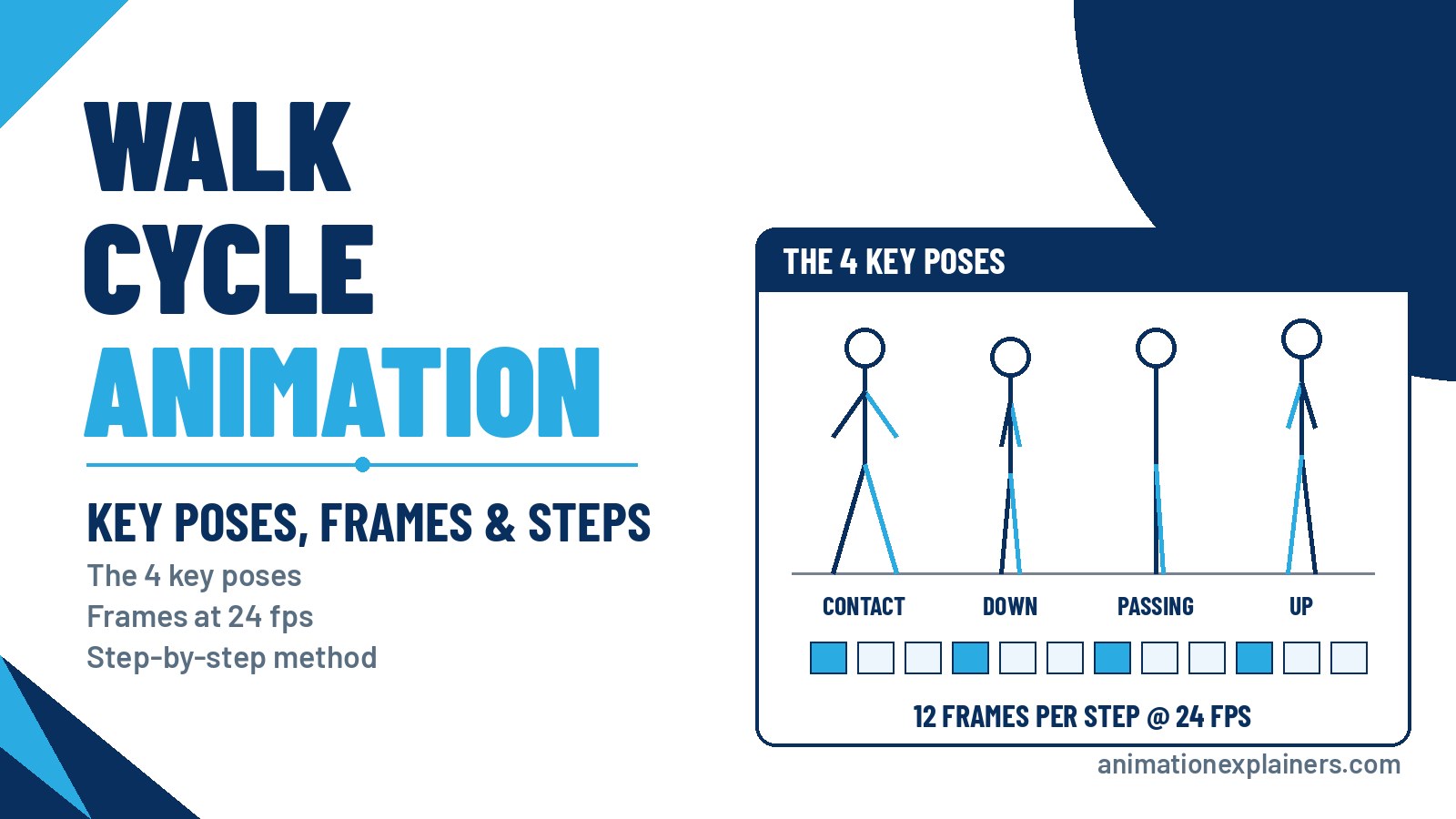
A walk cycle is a short sequence of frames that loops to show a character walking, so you don't have to animate every step again. It's built from four key poses (contact, down, passing and up) for each step, then mirrored for the other leg. At 24 frames per second, a natural walk takes about 12 frames per step, or a 24-frame cycle.
Walking looks simple, but it’s one of the hardest things to animate convincingly, because the legs, arms, hips, torso and head all move at once. This tutorial walks you through the key poses, timing, a frame chart you can copy, and the mistakes beginners make most often.
What is a walk cycle?
In animation, a walk cycle is a series of frames drawn in sequence that loop to create a walking character. Because the cycle repeats, the animator draws one full stride (two steps) and plays it over and over.
Walk cycles are a fundamental skill because almost every character walks, and the audience notices when it looks wrong. A good walk also conveys personality: the same basic mechanics can read as confident, tired, sad or excited.
Our short beginner’s walkthrough shows the key poses of a walk in motion:
Why walking animation is hard
A walk cycle uses more than half of the 12 principles of animation. Timing, slow in and slow out, and arcs control the rhythm. Follow-through and overlapping action move the arms, hair and clothing. Pose-to-pose organises the key positions.
The difficulty is that everything happens at once. If the weight shift, arm swing and head bob don’t line up, the character looks like it’s floating or limping, even if each body part is right on its own.
The four key poses of a walk cycle
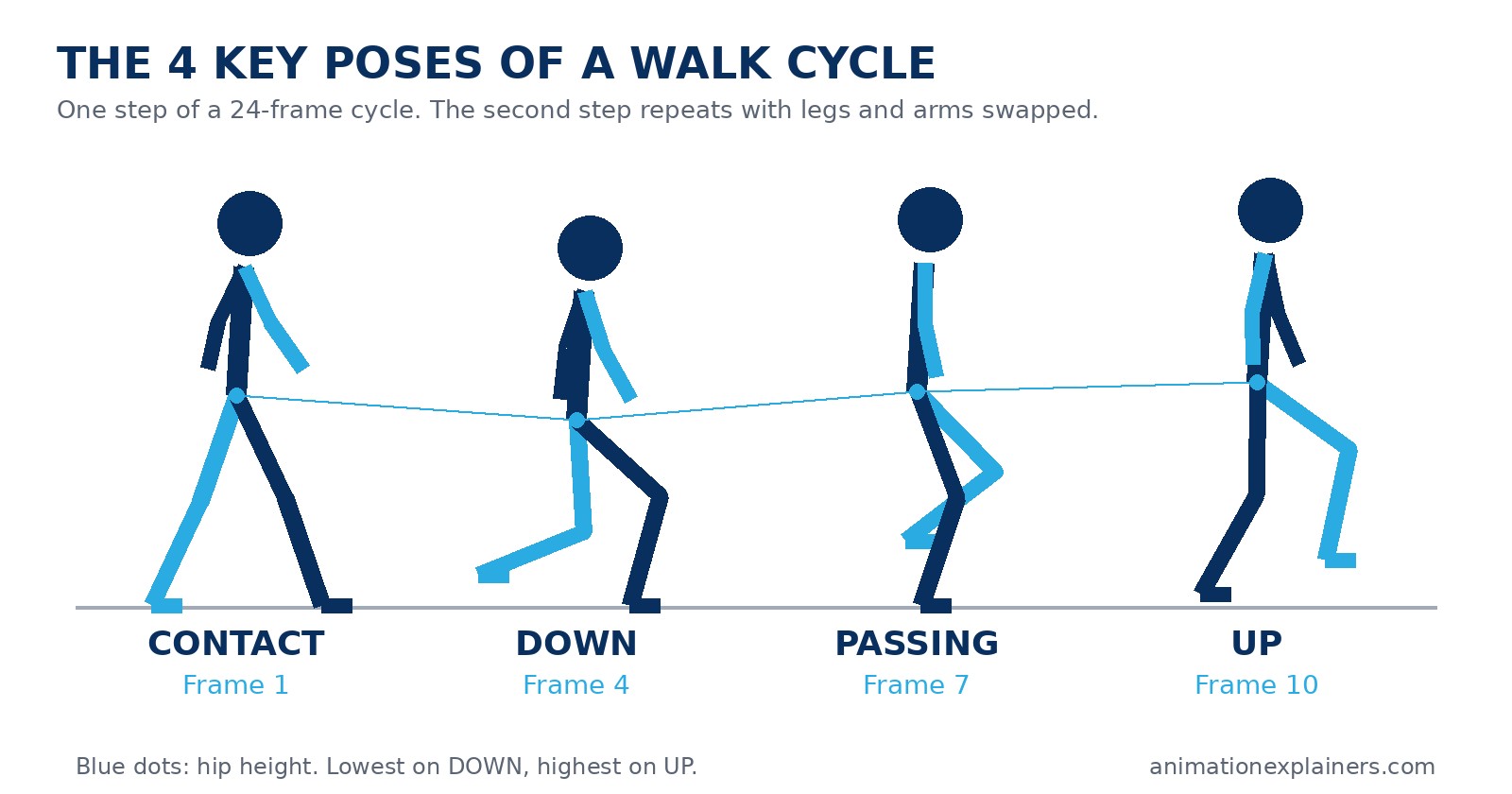
Each step in a walk is built from four poses. Draw these first, then add the in-betweens.
- Contact. Both feet are on the ground, at their widest stride. The front heel has just touched down and the back toe is about to push off. This pose sets the length of the step.
- Down. The front leg bends to take the weight and the body drops to its lowest point. This is where the walk feels heavy.
- Passing. The back leg swings forward past the standing leg. The body rises again, roughly halfway through the step.
- Up. The standing leg pushes off and the body reaches its highest point, just before the swinging foot reaches forward into the next contact.
The second step repeats the same four poses with the legs and arms swapped. The contact pose at the end of the second step is the same as the first, which is what lets the cycle loop.
Frames drawn between these key poses are called in-betweens. They can be drawn by hand or interpolated by software.
Different books and courses use different names for the same four poses, which is why walk cycle tutorials can look like they disagree. They don’t. Here’s how the names line up:
| Pose here | Also called | Body height | Frame (24-frame cycle) |
| Contact | Heel-to-toe, extreme, stride | Middle | 1 and 13 |
| Down | Recoil, landing, squash | Lowest | 4 and 16 |
| Passing | Pass, middle position | Rising | 7 and 19 |
| Up | High point, push-off | Highest | 10 and 22 |
How many frames is a walk cycle?
It depends on the speed and the character. At 24 frames per second, the timing guide adapted from Richard Williams’s The Animator's Survival Kit gives these lengths for a full cycle (two steps):
| Cycle length (24 fps) | Frames per step | Feels like |
| 16 frames | 8 | A fast, bouncy “cartoon” walk or slow run |
| 24 frames | 12 | A brisk, natural walk (two steps a second) |
| 32 frames | 16 | A relaxed stroll |
| 40 frames | 20 | An elderly or tired person |
| 48 frames | 24 | A slow, deliberate step (one step a second) |
A 24-frame cycle is the usual starting point for beginners: one second, one full stride.
Frames, ones and twos
At 24 fps, animating "on ones" means a new drawing on every frame, so 24 drawings per second. Animating "on twos" holds each drawing for two frames, so 12 drawings per second.
The speed of the walk stays the same either way; only the smoothness changes. Many 2D animators work on twos for normal walks because it halves the drawing count and still looks smooth.
A 24-frame walk cycle frame chart
Here’s a simple layout of the key poses for a 24-frame cycle, following the common practice of placing the contacts on frames 1, 13 and 25:
| Frame | Pose | Notes |
| 1 | Contact (right leg forward) | Widest stride; left arm forward |
| 4 | Down | Body at its lowest; front knee bends |
| 7 | Passing | Left leg swings past; body rising |
| 10 | Up | Body at its highest; push-off |
| 13 | Contact (left leg forward) | Mirror of frame 1 |
| 16 | Down | Mirror of frame 4 |
| 19 | Passing | Mirror of frame 7 |
| 22 | Up | Mirror of frame 10 |
| 25 | Contact (= frame 1) | Same as frame 1; leave it out of the loop |
Frame 25 is identical to frame 1, so play back frames 1 to 24. Including frame 25 gives the loop a small hiccup.
Free download: 24-frame walk cycle reference sheet (PDF). It has the four key poses and this frame chart on one printable A4 page.
How to animate a walk cycle, step by step
- Film or find reference. Watch a real walk at the speed you want and time it. If one stride takes a second, you need 24 frames.
- Set up the walk in place. Most cycles are animated on the spot, like a treadmill. The background or the character’s position moves separately.
- Draw the two contact poses. Get the stride length and balance right before anything else.
- Add the passing poses. Place them halfway between the contacts, with the body slightly higher.
- Add the down and up poses. These create the weight and the bounce.
- Check the arms. Arms swing opposite to the legs: when the right leg is forward, the right arm is back. They should swing on arcs from the shoulder, not in straight lines.
- Add the in-betweens. Fill the gaps by hand or with software interpolation.
- Layer in overlap. Add follow-through on hair, clothing and the hands. Then add the counter-rotation: the hips and shoulders twist in opposite directions, and the hip on the side of the swinging leg dips slightly.
- Loop it and watch it many times. Problems like a skating foot or a pop in the loop show up after a few repeats.
Walking in place vs walking across the screen
There are two ways to set up a walk, and the right one depends on how you’ll use it.
- In place (a cycle). The character stays on the spot, like it’s on a treadmill, while the planted foot slides back at an even speed. This is what you want for a walk you’ll loop and reuse. The scene, the camera or the character’s position then carries it forward.
- Across the screen (straight ahead). The character actually travels, and each planted foot stays fixed on the ground until it lifts. Use this for a one-off walk, such as a few steps to a chair, or when the steps have to land on specific marks.
If you move an in-place cycle across a scene, match the travel speed to the feet. If the planted foot appears to slide backwards, the character is moving too slowly; if it slides forwards, it’s moving too fast. Adjust the distance or the timing until the foot looks locked to the ground.
Hips, torso, arms and head: the motion that sells the walk
Legs alone make a walk look mechanical. Once the four poses work from the side, add the movement in the rest of the body, ideally checking it from the front as well:
- Hips go up and down. They are lowest on the down pose and highest on the up pose. This rise and fall is what gives the walk weight.
- Hips tilt and twist. Seen from the front, the hip drops on the side of the swinging leg and rotates forward with the stepping leg. A little goes a long way.
- The chest turns against the hips. When the hips rotate one way, the shoulders rotate the other. This counter-twist stops the body looking like one stiff block.
- Arms swing like pendulums. They move opposite to the legs, swing on arcs from the shoulder, and trail a frame or two behind the leg timing. Keep a slight bend at the elbow.
- The head stays fairly level. It bobs with the body but less than the hips. Too much bob and the character looks like it is pecking.
Work in that order: hips first, then the chest, arms and head, then small overlaps such as hair, clothes or a tail. Each layer is easier to judge once the one under it is right.
How to use reference for a walk cycle
- Film yourself or a friend walking side-on past the camera at the speed you want, ideally at 24 or 25 frames per second.
- Step through the footage frame by frame and note where each contact lands. That gives you the real frames per step for that walk.
- Mark the key poses. Find the contact, down, passing and up frames and sketch them as thumbnails.
- Copy the timing, not every detail. Real walks are subtle; animation usually pushes the poses a little further so they read on screen.
- Film the walk you want, not a generic one. A tired walk, a proud walk and a sneak all have different timing, so act out the one your character needs.
Common walk cycle mistakes
- Sliding feet. In an in-place cycle, the planted foot must move back at a steady rate. Otherwise the character looks like it’s skating.
- Arms and legs in sync. Arms and legs on the same side should move in opposite phases. Getting this wrong produces a physically impossible walk.
- No up and down. Without the down and up poses, the body glides at one height and looks like it’s floating. Keep the bob small, though: too much reads as bouncy or cartoony.
- Arms that swing in straight lines. Arms pivot from the shoulder, so the hands should travel on arcs.
- A stiff torso. The hips and shoulders twist in opposite directions as the character walks.
- A hiccup in the loop. Usually caused by repeating the first frame at the end of the cycle.
Which software to animate a walk cycle in
The poses and timing are the same in every program. What changes is how much the software does for you:
| Type of animation | Common tools | How the walk is made |
| Hand-drawn 2D | Toon Boom Harmony, Adobe Animate, TVPaint, Krita, OpenToonz | Draw the keys, then the in-betweens, frame by frame |
| Rigged 2D | Adobe After Effects with a character rig, Moho, Harmony rigs | Pose a puppet on the key frames and let the software fill the gaps |
| 3D | Blender, Maya, Cinema 4D | Key the rig, then refine the curves in the graph editor |
| Stop motion | Dragonframe or a phone app with a puppet or clay model | Move the model a little and capture each frame in order |
Krita, OpenToonz and Blender are free, so they are a good place to practise. If your walk is for a business film rather than practice, the rig and the design matter as much as the timing, which is where an explainer video production team helps.
Our 2026 showreel shows the kind of character animation we make for business explainers:
Run cycles: how a run differs from a walk
A run uses the same idea of contact, down, passing and up, but with one big difference: in a walk one foot is always on the ground, while a run has a moment where both feet are in the air.
- No double contact. A walk has a pose with both feet planted; a run never does. Only one foot touches the ground at a time.
- A flight phase. After push-off the body leaves the ground before the other foot lands.
- Fewer frames per step. Runs are faster, so each step takes fewer frames than a walk at the same frame rate.
- More lean and bigger arms. The body tilts forward, the arms bend more and pump harder, and the down pose is deeper to absorb the landing.
Start a run the same way as a walk: get the contact and the highest point right, then add the down and passing poses.
Four-legged walk cycles
Animals such as dogs, cats and horses use a four-beat walk: each foot lands separately, and the legs on the same side move one after the other. A common order is left hind, left front, right hind, right front.
- Animate the back legs first as if they were a two-legged walk.
- Offset the front legs so each front foot moves a little after the back foot on the same side.
- Add the spine. Shoulders and hips rise and fall at different times, so the back flexes and twists.
- Finish with the head and tail. They follow through and overlap the body’s movement.
Study real reference: Eadweard Muybridge‘s photo sequences of animals in motion are still widely used by animators.
Giving a walk personality
Once the mechanics work, change them to tell the audience who the character is. A longer stride and a higher “up” reads as confident. A lowered head, short steps and slow timing read as tired or sad. A bouncier, faster cycle feels playful.
Disney animator James Baxter gave Belle in Beauty and the Beast (1991) a graceful, ballet-inspired walk that still felt believable. It’s a good example of the same four poses carrying a whole personality.
Walk cycles in 2D, 3D and stop motion
The four poses are the same whatever the medium. Walk cycles are traditionally hand-drawn, but they’re also made in pixel art, 2D digital animation, 3D computer animation, stop motion such as claymation, silhouette animation and cut-out animation, and by rotoscoping live footage.
In 3D, software interpolates between your keys, so the job shifts from drawing in-betweens to refining curves and timing. For more practical advice, see our animation tips and our overview of the different types of animation.
Character animation is a big part of what we do in explainer videos, where a character’s walk or gesture often carries the story. If you’d like a character-led explainer for your business, see how our explainer video production works.
Here’s an example of character animation in one of our recent explainers, made for Vertech:
FAQ
What is a walk cycle in animation?
A walk cycle is a series of frames that loop to show a character walking. The animator draws one full stride (two steps) and repeats it, so every step doesn’t have to be animated again.
What are the four poses of a walk cycle?
Contact, down, passing and up. Contact is the widest stride, down is the lowest point as the front leg takes the weight, passing is when the back leg swings past, and up is the highest point before the next contact.
How many frames is a walk cycle?
At 24 frames per second, a natural walk is usually a 24-frame cycle, or 12 frames per step. Faster walks use around 16 frames and slower walks 32 to 48 frames.
How many drawings do I need for a walk cycle?
It depends on whether you animate on ones or twos. A 24-frame cycle on twos needs 12 drawings; on ones it needs 24. The speed of the walk is the same either way.
How do I make a walk cycle look natural?
Start from reference, nail the contact and passing poses, add the down and up poses for weight, swing the arms opposite to the legs and add a little hip and shoulder rotation. Then loop it and fix anything that pops or slides.
Why do my character’s feet slide?
In an in-place walk, the planted foot must move backwards at a constant rate across the frames it’s on the ground. If the spacing is uneven, the foot appears to skate.
Should I animate a walk in place or moving forward?
Animate it in place if you’ll loop and reuse it; the scene or the character’s position moves it forward. Animate it moving across the screen for a one-off walk where each foot needs to land on a particular spot.
Why does my walk look like it’s floating?
Usually because the body stays at one height or the feet slide. Make the down pose lower and the up pose higher, and match the speed the character travels to the speed of its planted foot.
What’s the difference between a walk cycle and a run cycle?
In a walk, at least one foot is always on the ground. In a run, there are moments when both feet are off the ground, and the cycle is usually shorter.
Can Animation Explainers animate characters for my business video?
Yes. Character animation is a core part of our explainer videos. Tell us about your audience and message, and we’ll suggest a style and approach that fits.
Is there a walk cycle reference sheet I can download?
Yes. Our free 24-frame walk cycle reference sheet (PDF) shows the four key poses and the frame chart on one printable page. The link is under the frame chart in this guide.
How do you animate a four-legged walk?
Animate the back legs like a two-legged walk, then offset each front leg slightly behind the back leg on the same side. Add the flex of the spine, then the head and tail follow-through.
What frame rate should a walk cycle be?
Animation for film and video usually runs at 24 frames per second. Many 2D animators draw on twos, holding each drawing for two frames, which halves the drawing count.
What is the passing pose in a walk cycle?
It’s the middle of the step, when the swinging leg passes the standing leg. The standing leg is straight under the body, the swinging foot is just clear of the ground and the arms are near the sides. On a 24-frame cycle it usually falls on frames 7 and 19.
What software is best for animating a walk cycle?
Any animation program works, because the poses and timing don’t change. For hand-drawn 2D, Toon Boom Harmony, Adobe Animate or free tools like Krita and OpenToonz are common. For rigged 2D, After Effects or Moho. For 3D, Blender or Maya.
Is a walk cycle the same as walking animation?
Mostly, yes. A walk cycle is a loop of one full stride that repeats, while walking animation can also mean a one-off walk that changes as it goes, such as a character slowing down or turning. Most walking animation starts from a cycle.
How do I make the hips move in a walk cycle?
Animate the up-and-down first, then add tilt and rotation. The hips are lowest on the down pose and highest on the up pose. Then, from the front, drop the hip on the side of the swinging leg and rotate it forward with the stepping leg, with the chest turning the opposite way.

What is a walk cycle in animation?
A walk cycle is a series of frames that loop to show a character walking. The animator draws one full stride (two steps) and repeats it, so every step doesn’t have to be animated again.
What are the four poses of a walk cycle?
Contact, down, passing and up. Contact is the widest stride, down is the lowest point as the front leg takes the weight, passing is when the back leg swings past, and up is the highest point before the next contact.
How many frames is a walk cycle?
At 24 frames per second, a natural walk is usually a 24-frame cycle, or 12 frames per step. Faster walks use around 16 frames and slower walks 32 to 48 frames.
How many drawings do I need for a walk cycle?
It depends on whether you animate on ones or twos. A 24-frame cycle on twos needs 12 drawings; on ones it needs 24. The speed of the walk is the same either way.
How do I make a walk cycle look natural?
Start from reference, nail the contact and passing poses, add the down and up poses for weight, swing the arms opposite to the legs and add a little hip and shoulder rotation. Then loop it and fix anything that pops or slides.
Why do my character’s feet slide?
In an in-place walk, the planted foot must move backwards at a constant rate across the frames it’s on the ground. If the spacing is uneven, the foot appears to skate.
Should I animate a walk in place or moving forward?
Animate it in place if you’ll loop and reuse it; the scene or the character’s position moves it forward. Animate it moving across the screen for a one-off walk where each foot needs to land on a particular spot.
Why does my walk look like it’s floating?
Usually because the body stays at one height or the feet slide. Make the down pose lower and the up pose higher, and match the speed the character travels to the speed of its planted foot.
What’s the difference between a walk cycle and a run cycle?
In a walk, at least one foot is always on the ground. In a run, there are moments when both feet are off the ground, and the cycle is usually shorter.
Can Animation Explainers animate characters for my business video?
Yes. Character animation is a core part of our explainer videos. Tell us about your audience and message, and we’ll suggest a style and approach that fits.
Is there a walk cycle reference sheet I can download?
Yes. Our free 24-frame walk cycle reference sheet (PDF) shows the four key poses and the frame chart on one printable page. The link is under the frame chart in this guide.
How do you animate a four-legged walk?
Animate the back legs like a two-legged walk, then offset each front leg slightly behind the back leg on the same side. Add the flex of the spine, then the head and tail follow-through.
What frame rate should a walk cycle be?
Animation for film and video usually runs at 24 frames per second. Many 2D animators draw on twos, holding each drawing for two frames, which halves the drawing count.
What is the passing pose in a walk cycle?
It’s the middle of the step, when the swinging leg passes the standing leg. The standing leg is straight under the body, the swinging foot is just clear of the ground and the arms are near the sides. On a 24-frame cycle it usually falls on frames 7 and 19.
What software is best for animating a walk cycle?
Any animation program works, because the poses and timing don’t change. For hand-drawn 2D, Toon Boom Harmony, Adobe Animate or free tools like Krita and OpenToonz are common. For rigged 2D, After Effects or Moho. For 3D, Blender or Maya.
Is a walk cycle the same as walking animation?
Mostly, yes. A walk cycle is a loop of one full stride that repeats, while walking animation can also mean a one-off walk that changes as it goes, such as a character slowing down or turning. Most walking animation starts from a cycle.
How do I make the hips move in a walk cycle?
Animate the up-and-down first, then add tilt and rotation. The hips are lowest on the down pose and highest on the up pose. Then, from the front, drop the hip on the side of the swinging leg and rotate it forward with the stepping leg, with the chest turning the opposite way.